



When I first got into blogging, I did it for fun. I knew you could *probably* make $50 a month somehow, but I wasn’t quite sure how you did that.
Fast forward 3 kids and 8 years later, and I’ve learned a lot about this new frontier!
I started blogging when my oldest was born, took a break after baby #2 and picked it back up again once my youngest turned 2.
My blog now makes enough each month to pay for our mortgage. I have been fortunate to have many mentors along the way who generously doled out valuable tips and tricks.
Now that I feel like I have a grasp on this “blogging thing” I want to pay it forward to others who want to get into the blogging world.

1) You don’t have to be a good writer.
Although I’ve always loved writing, I would say I’m rather slow at it. Lucky for me, writing comes easier over time. When I am in the mood to write, I can knock out a post in 30 minutes. One thousand blog posts into this thing, and I finally feel like the words flow pretty easily (when I’m in the mood to write, that is!). If you really don’t want to write much at all but want to blog, then you can always specialize in photo-heavy formats like food blogging or crafting. The success of those types of posts hinges on photos, not words.
One thing in blogging is more important that writing skills – it’s relatability. If I can’t relate to what the blogger is saying or don’t feel welcome on the blog, it won’t matter how good of a writer she is. I won’t stick around to find out! First aim to relate to your readers, then the writing part will come later with practice.
2. You don’t have to spend a lot money to make a lot of money.
The best thing about the internet is that social media sites (that bring in a lot of traffic) like Facebook, Pinterest, Twitter are free to use. And you can be found in Google for free!
I meet many new bloggers who think they need the latest and greatest custom blog design, business cards, and to set up a separate legal entity before they start blogging. A well kept secret held by many bigger bloggers is that none of that stuff matters. What matters is how many people visit your site and how many people are talking about your content on social media. Your blog visitors won’t care if your template was off the shelf or created by a luxury website designer. They also won’t care if you have business cards or have created the appropriate legal entity – all they see is your blog post anyway!
3. You don’t have to be technologically savvy.
I know how to use Microsoft Word and Excel. I know almost nothing about html. I definitely don’t know how to fool with PHP files or CSS coding language (both things my blogs run on…I think).
Even starting a blog doesn’t take that much technical know-how these days. When friends come to me asking for help starting a blog, I like to refer them to the best resources for new bloggers.

Recently I learned about a great option for beginner and growing bloggers. It’s HostGator’s new Optimized WordPress. It’s a premium product that, for a small fee, can be added to the already robust HostGator service package. This new hosting platform is specifically built for an optimized (a.k.a “well run”) WordPress blog (FYI – WordPress is what I use for my blog). Optimized WordPress hosting packages come pre-loaded with PHP 5.6 by default (the most recent PHP version offered).
As part of the Optimized WordPress package, HostGator will handle common updates to your WordPress blog without you having to log in. In the blogging world, a missed update is not a good thing – hackers use holes in outdated software to access and screw up your blog!
Additionally, Optimized WordPress will protect your site with “sitelock” malware scanning and removal plus daily backups and restores. This is important in the event you ever are hacked and need help restoring your blog.
Optimized WordPress does not provide cPanel access, which essentially means that you don’t have to bother with a really complicated panel upon login. Your site will just work without you having to touch it!
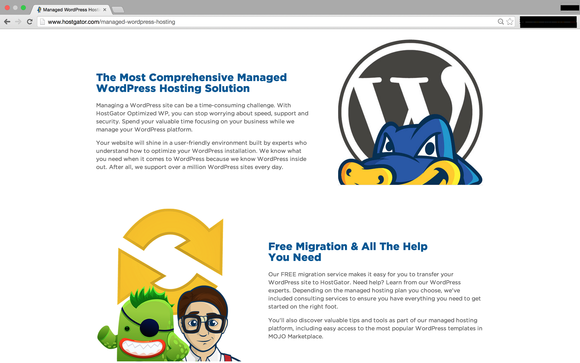
What’s neat about HostGator is that they provide 24/7 live support via chat, phone, and email. I’ve never had that before in a hosting company, so this is a big deal to me!
A few more features I dig about HostGator:
- They offer one-click WordPress installs. Basically, this means you click one button and Poof! your site is ready to go with the best blogging platform out there.
- They offer an easy-to-use website builder with drag and drop tools. This is perfect for those with limited technical skills *raises hand*
- They also offer design and marketing services should you ever need those.
Keep in mind that if you sign up with HostGator, you can also get your domain through them. It’s a one-stop shop for the nuts and bolts of your first blog!
For more information about HostGator, visit them online. If you give their services a try, let me know in the comments below!
I was selected for this opportunity as a member of Clever Girls and the content and opinions expressed here are all my own.




J says
I paid and signed up dream host and genesis, through your suggestion, it has been a nightmare, they don’t help me. At dream host and there is no live chat at genesis, and I can’t download child theme. I am so frustrated
Lena Gott says
Hi Joe – I would love to help. I visited your blog…I loved your first post about the fire pit! I’m posting it here for everyone because the link in your signature doesn’t go to your blog. http://www.mydaddoes.com/sample-page/
I’m surprised you haven’t gotten any help from DH or Genesis. I always get a response within a couple hours from Dreamhost and with Genesis, I actually use the support via the StudioPress forums that comes with the themes I recommended in my starting a blog post: https://www.whatmommydoes.com/mom-blog-tips/
I see you are using a free theme and not StudioPress. I think you’ll find that makes the biggest difference. If you go that route, I think you’ll be extremely pleased with the help forums.